How Wallet Radar Works: Data, Scores and How to Read Them
Where Wallet Radar data comes from, how the 0-100 scores are computed (with one wallet recomputed by the script), and how to read the tables, filters and compare view.
How Wallet Radar Works
Wallet Radar is four markdown tables and one script. The tables hold what we could source about software wallets, hardware wallets, crypto cards and ramps. The script turns each row into a 0-100 score. The website reads the same tables and the same scoring code, so what you see is what the script computes.
This page covers where the data comes from, how a score is built, how to read the comparison pages, and where the numbers stop being reliable. Counts are from the tables on 2026-10-17: 33 software wallets, 43 hardware wallets, 63 cards and 22 ramps.
Where the data comes from
Source order is fixed. We use official docs and sites first, then GitHub, then structured third-party data.
- Official sites and docs. Prices, fees, regions, supported chains and product status. Card and ramp rows link to the issuer or provider page.
- GitHub. Repository, licence, last commit date and release count come from the GitHub API. Activity uses one rule: last commit within 30 days is Active, 31 to 120 days is Slow, more than 120 days is Inactive.
- WalletBeat. For some software wallets we read facts from the MIT-licensed WalletBeat data files: account types, licence, audits, bug bounty, funding flags. The snapshot we used is pinned to one commit (2026-10-10) and listed on the Data Sources page.
- WalletScrutiny. Used for the reproducible-build attribute on 10 software wallet entries.
- Issuer pages. Card network and KYC requirement for cards.
A weekly GitHub Actions job (Mondays, 09:00 UTC) re-reads the GitHub data for every tracked repository and opens a pull request with activity reports. It writes reports only. It does not edit the tables or any score. A person reads the report and edits the table. A second weekly job (Mondays, 10:00 UTC) regenerates the Google Merchant Center feed for hardware wallets from a hand-kept price file. It does not feed the scores.
The last recheck was 2026-10-15. Values re-fetched from a primary page or API that day were updated. Values we could not confirm are marked UNVERIFIED with the reason. Scores are regenerated by script, never typed. The log of changes, with source URLs, is in docs/VERIFICATION.md.
Some data is shown but not scored. Bug bounty status, reproducible build and on-chain verification for software wallets, and card network and KYC for cards, live in a separate file (data/attributes.json) with a source URL and a retrieval date on every entry. They appear under "Sourced attributes" on software wallet and card detail pages. Hardware and ramp pages do not have that section. Where we have no primary source the page says "Not evaluated", which means unknown, not no.
How a score is computed
Each table row is a line of cells. The scoring code (frontend/src/lib/scoring.js) reads those visible cells, turns each into points with fixed rules, adds the points and rounds to a whole number from 0 to 100. There are no hidden inputs and no hand adjustments. Changing a scored input can change the score.
The same code runs in two places. scripts/sync_table_scores.js rewrites the Score and Rec cells in the markdown and sorts rows by score. The site build runs the same functions and shows the result. A smoke test fails if the markdown and the computed values drift apart.
The method is defined once, in the contributing guide and the scoring code. This page does not copy it. In short:
- Each table has its own categories and weights, so scores are only comparable inside one table.
- Software wallets are scored for a developer who needs a wallet to test dapps against. Core readiness is the gate, and developer safety and control (transaction simulation, custom RPC, testnets, scam alerts, hardware signing) is the largest category.
- Hardware wallets are scored on security architecture, transparency and maintenance, usability and value, and company track record.
- Cards are scored on product model, custody and coverage, rewards, fees and delivery confidence. An inactive card loses 28 raw points before the result is scaled to 100.
- Ramps are scored on coverage, product breadth, developer UX, pricing and operational confidence.
- When a cell is missing or marked TBD, the code uses a default value for it. The score is then computed from a default, not from a sourced fact.
One wallet, recomputed by the script
Rabby's row in data/tables/SOFTWARE_WALLETS.md reads, in the cells that matter: Core ✅, Rel/Mo ~4, RPC ✅, GitHub linked, Active ✅, Chains one EVM icon, Devices 📱🌐💻, Testnets ✅, License ✅ MIT, API 🌐 Public, Audits ⚠️, Funding 🟢, Tx Sim ✅, Scam ✅, Account EOA+Safe, ENS ⚠️ Import only, HW ✅.
We ran the scoring function on that row from the repo root:
const fs = require('fs');
const { computeSoftwareScore } = require('./frontend/src/lib/scoring.js');
const row = fs.readFileSync('data/tables/SOFTWARE_WALLETS.md', 'utf8').split('\n').find((l) => l.includes('**Rabby**'));
const cells = row.split('|').slice(1, -1).map((c) => c.trim());
const info = computeSoftwareScore(cells);
console.log(info.score, info.recommendation);
for (const b of info.breakdown) console.log(`${b.label}: ${b.score}/${b.max}`);
Output:
86 recommended
Core Readiness: 20/20
Release Discipline: 13/15
Developer Safety & Control: 24/24
Ecosystem & Accounts: 7/15
Transparency & Access: 13/14
Maintenance & Assurance: 9/12
The 86 matches the Score cell in the table and the breakdown on Rabby's detail page. The table is read off scoring.js as of this date. If the code changes, the code is right and this table is not.
| Category | Points | Why |
|---|---|---|
| Core Readiness | 20 | Core is full, and the Devices cell has both mobile and browser |
| Release Discipline | 13 | About 4 releases a month falls in the "3 to 4" tier. 2 or fewer gives 15, 5 to 6 gives 11, more than 8 gives 5 |
| Developer Safety & Control | 24 | Tx simulation 10, custom RPC 4, scam alerts 4, testnets 4, hardware wallet support 2 |
| Ecosystem & Accounts | 7 | One chain family 1, Safe support 3, ENS import only 1, desktop app 2 |
| Transparency & Access | 13 | Public repo 3, open licence 4, public API 3, sustainable funding 3 |
| Maintenance & Assurance | 9 | Active 7, audit cell with ⚠️ scores as an old audit, 2 |
20 + 13 + 24 + 7 + 13 + 9 = 86. The weakest line is Ecosystem, 7 of 15, because the table lists one chain family for Rabby. A second chain family would move the chain line from 1 to 3. The score moves only when the visible data moves.
Check any table for drift without writing anything:
bun scripts/sync_table_scores.js
It prints clean per table, or drift and exits with code 1.
From score to Rec
The coloured Rec mark (🟢 🟡 🔴 ⚪) is a rank band set per table each time the script runs, not a fixed cutoff like "70 and up":
- Inactive rows are 🔴 Avoid, whatever their score.
- For software wallets, a row that fails the developer gate (Core not full, or Developer Safety & Control of 10 or less) is ⚪ Not for dev.
- The remaining rows are sorted by score, lowest first. The bottom
floor(N × 0.25)rows are 🔴, the next rows up tofloor(N × 0.5)are 🟡, and the rest are 🟢. Rows with equal scores are ordered as they appear in the table. - A "launching" product cannot be 🟢. It is capped at 🟡.
The software table shows how much this matters. Of 33 wallets, 17 are ⚪ because they miss the developer gate. Only 9 are ranked: 2 🔴, 2 🟡, 5 🟢. With the inactive rows that makes 9 🔴 in all. Rabby is 🟢 because it is in the top 5 of 9, not because 86 crosses a line. Elsewhere: 43 hardware wallets give 18 🟢, 9 🟡, 16 🔴; 63 cards give 29, 16, 18; 22 ramps give 11, 6, 5.
How to read a comparison
Open Explore. Four tabs sit at the top: Software, Hardware, Cards and Ramps, each with its row count. Switch between cards and a table. The table is the dense view.
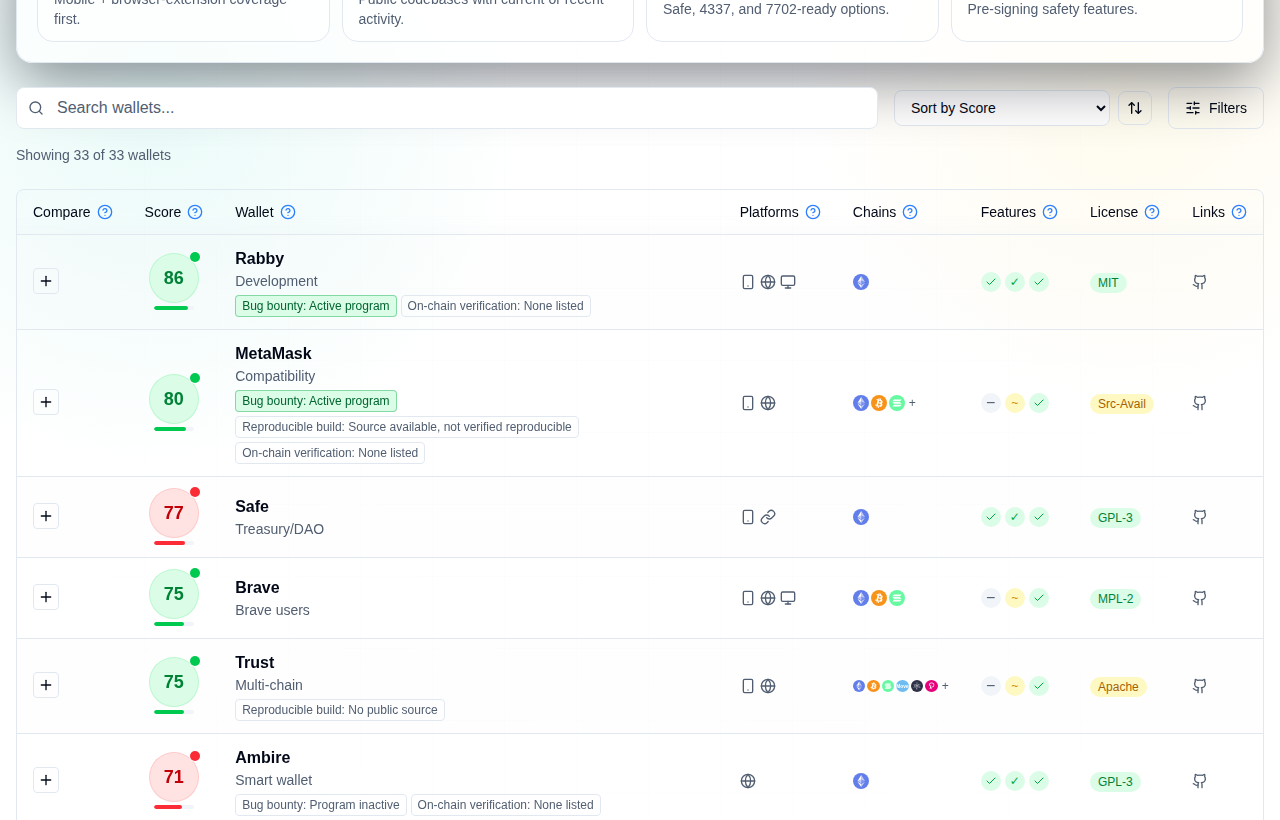
Software tab in table view. Rows are sorted by score, highest first.
The score badge
The number in the circle is the score out of 100. The colour of the circle, the small dot on its corner and the bar under it all show the Rec band, not the score range. Green is Recommended, yellow is Situational, red is Avoid or Not for dev. The bar length is the score. Hover the badge in a table for the score, the Rec, the methodology version and the category breakdown.
Because the colour is a rank band, a high score can still be red. Safe scores 77 and shows red, because its Core cell is ❌ and the software table marks it Not for dev. The same score can also be green in one table and yellow in another.
Columns and marks
Column headers have a help icon with the definition. Feature columns use a green tick for full support, a yellow tilde for partial and a dash for none.
| Mark | Meaning |
|---|---|
~ before a number | Approximate or volatile value, such as a price or a release rate |
UNVERIFIED | We could not confirm the value from a primary source on the check date. The old value is kept and the reason is written next to it |
‡ in the hardware and ramps tables | Same as UNVERIFIED. A footnote under the table says why. Cells marked this way still feed the score |
‡ and other symbols in the software table | Row notes (†, §, ‡, ⁂, ∆) explained in the note under that table. They are not verification marks |
TBD | No sourced value yet. The score uses a default for that cell, so treat it as less certain |
| Status Inactive (software, hardware) | The tracked GitHub repo has had no commit for more than 120 days. The product may still be sold or used |
| Status Inactive (cards, ramps), or "Discontinued" in the text | The product has shut down or been wound down. It stays in the table so people can see it, and the score is penalised |
Filters, sort and search
The search box matches names. Sort options depend on the tab, for example score, name, chain count or release frequency for software. The Filters button opens the panel.
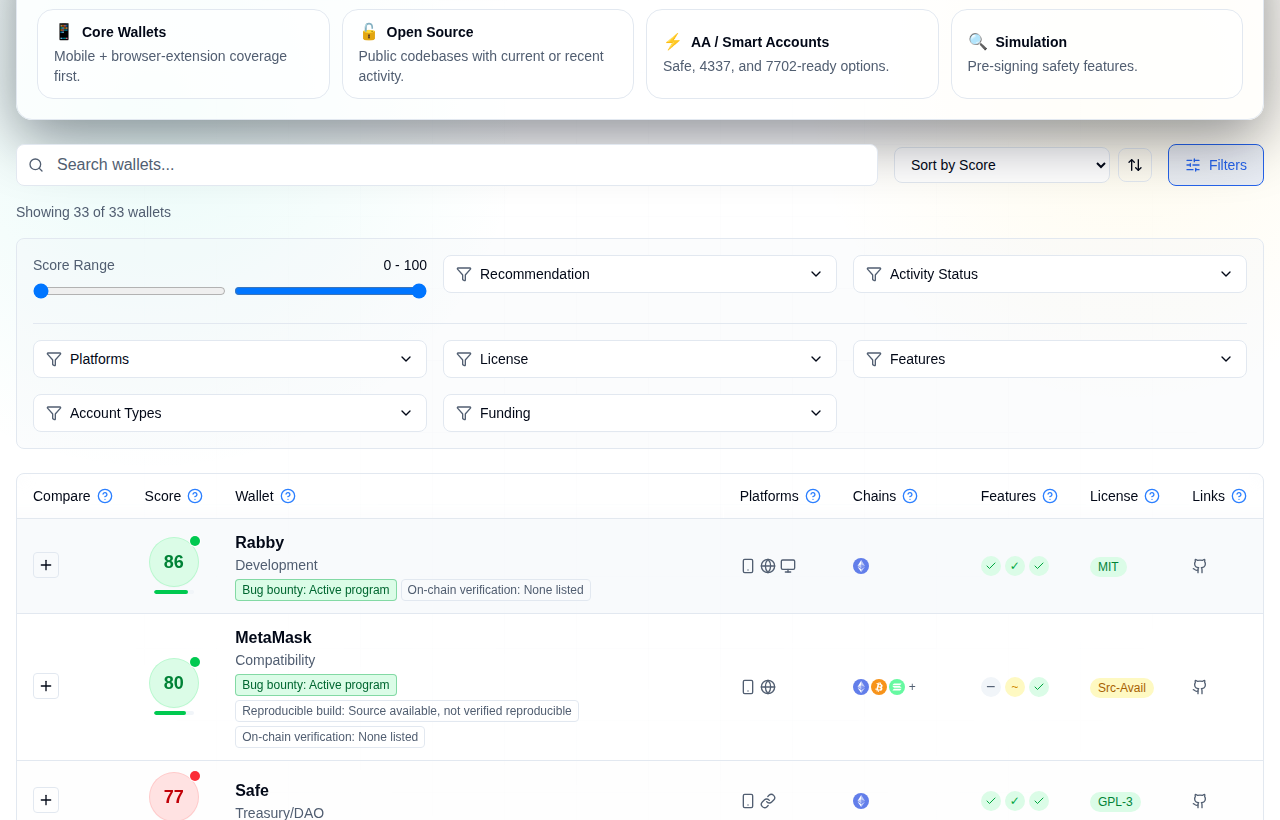
Filters and sort on the Software tab.
Filters differ per tab. Software has Rec, platform, licence, features, account type, activity, funding and a score range. Hardware adds price, open-source level and connectivity. Cards add type, custody, status, region and minimum cashback. Presets above the table (for example Core Wallets or Air-Gapped) set several filters at once.
Compare
Press the plus button on up to four rows, then open Compare. It shows score, Rec, each feature, release rate and category scores side by side, marks the best and worst value on a row, and can export a CSV or copy a link.
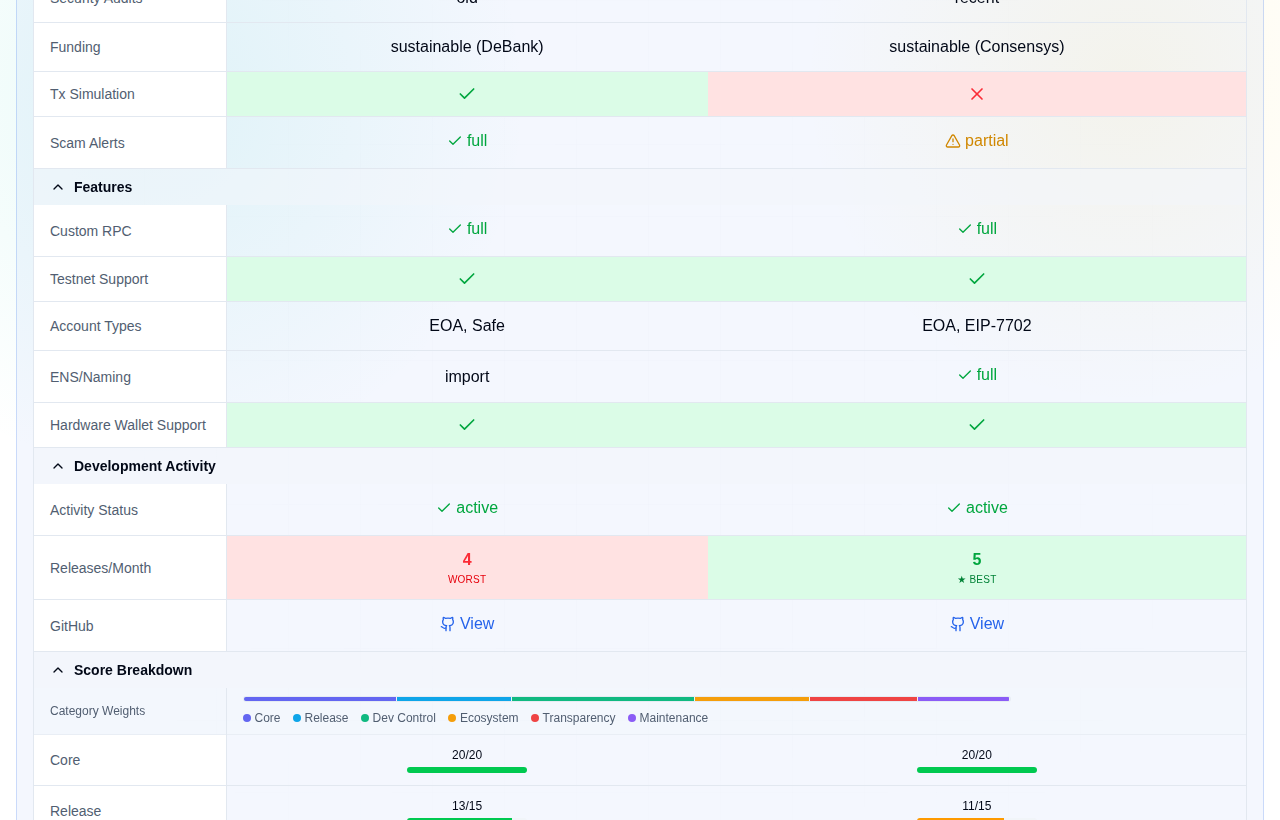
Rabby (86) and MetaMask (80), side by side. The top of the view shows both scores and the Rec.
State lives in the URL
Tab, view, search, sort, filters and the selected rows are all stored in the address, so a link reproduces your view. For example, /explore/?tab=software&view=table&sw=rabby,metamask&compare=1 opens the compare view above. Unknown values are dropped, so a stale link falls back to the default instead of breaking.
Detail pages
Each row has a page, such as /wallets/software/rabby/. It shows the score, the category table (weight, points earned, completion) and the closest rows by score. Software wallet and card pages also show sourced attributes with source links.
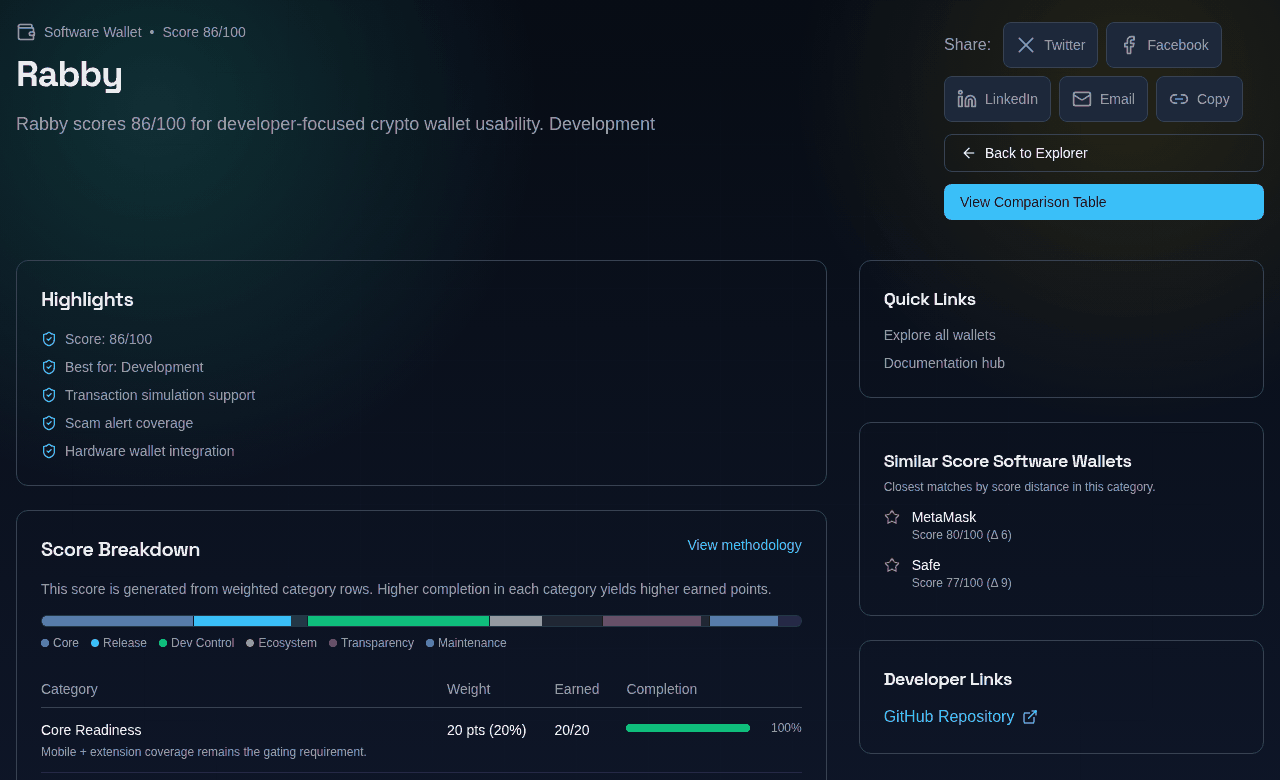
A detail page. The points match the script output above.
Cards and discontinued products
Card rows keep products that have shut down. Cypher Card and Ready Card are marked Discontinued and score 1 and 41. Their Status is Inactive, which drives the penalty and the red band. Set the Status filter to Inactive to list them: 4 of the 63 cards.
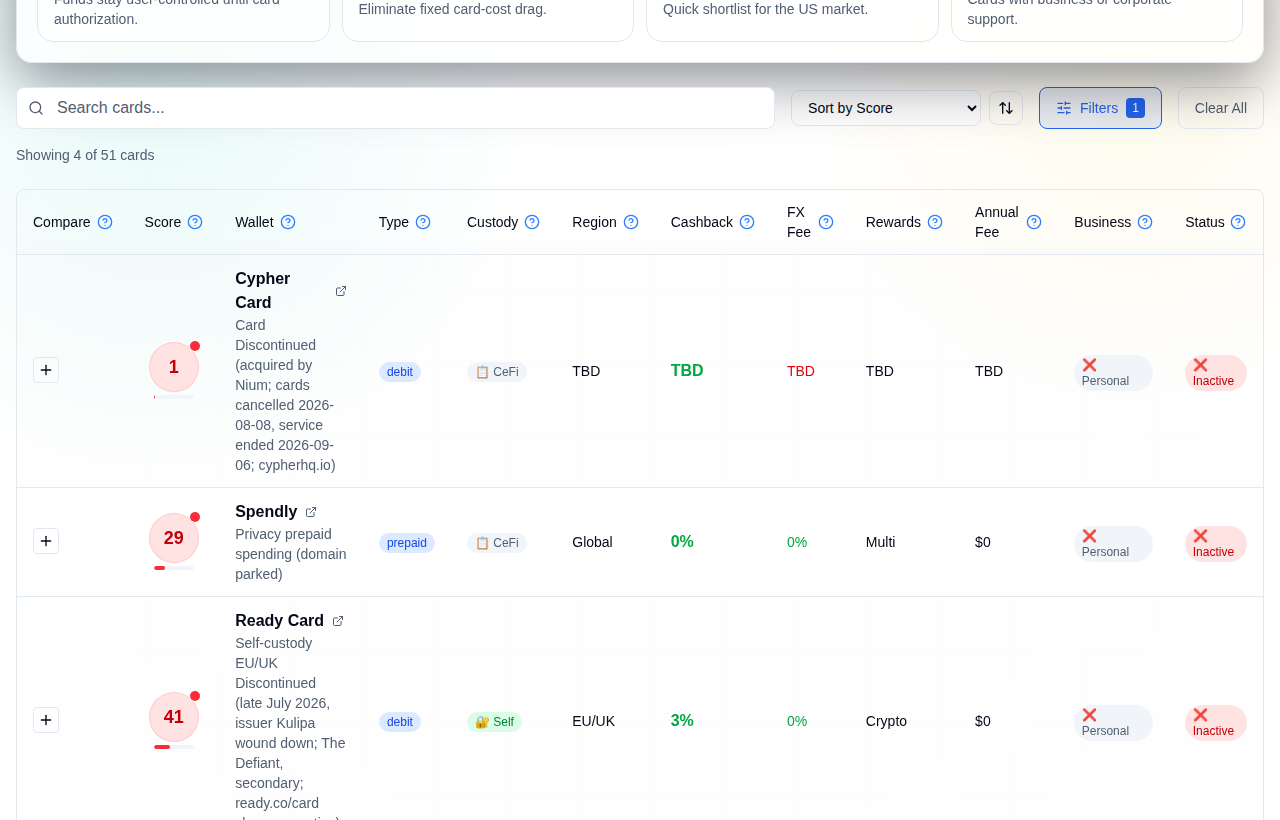
Cards filtered to Status Inactive. The raw text of the source cell is shown under each name, including the Discontinued note.
A card's detail page does not show the penalty. Cypher Card's five categories add up to 29 raw points. The 28-point inactive penalty comes off, then the result is scaled, which gives 1.
On a phone the table keeps all its columns and scrolls sideways.
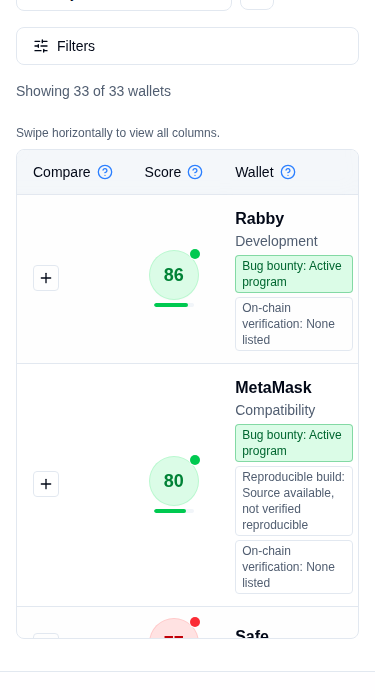
The same page at phone width.
Limits
- A score ranks rows inside one table. An 86 software wallet and an 86 ramp are not comparable. Hardware, cards and ramps use different categories and different weights.
- The software score is built for developers. If you hold a long-term balance and never test dapps, the ranking may not match what you want. The weights are in one file, so you can read them and disagree.
- Rec is relative. The software ranking is over 8 wallets, so one new row can move a wallet between bands with no change to its own data.
- Only table cells count. Anything that is not a column, such as support quality, incident history or a team's reputation, is outside the score. Hardware incidents appear in the details pages, not in the number.
- Unsourced cells still score. TBD cells use a default. UNVERIFIED and ‡ cells keep their old value and still feed the score.
- Not every cell was re-fetched. Several issuer and store sites block automated checks, so those values stay UNVERIFIED until someone confirms them by hand.
docs/VERIFICATION.mdlists them. - Rates and prices move. Read the provider page before you sign up or pay.
- QR payment providers are not scored by the script. Their scores are older estimates and are not recomputed.
- GitHub activity is a proxy. A wallet can ship from a private repo or from a different repo than the one we track. A software or hardware row marked Inactive means the tracked repo is quiet, not that the product is gone. Private-repo wallets show as Private, with a lower activity score.
Check it yourself
Everything here is in the public repo: the tables at the root, the scoring in frontend/src/lib/scoring.js, the sync in scripts/sync_table_scores.js, the data sources page and the contributing guide. If a number is wrong, send a pull request that changes the cell and adds the source link. Run the sync script and the score follows.